
Help Center Home

 Billing History &
        Account Info
 

 My Password

 Update My Payment Info

 Update My Address

 Upgrade My Account

 Billing Questions

 Access Numbers

 Connection Issues

 Email Questions

 Get Juno Software

 Safety/Security

 Contact Us

 
Select a different
Operating System


How do I enable Parental Control?

Please follow the steps below to enable Parental Control.

  1. Open Norton Internet Security, and click the Norton Add-on Pack tab.
  2. Click Settings, then click Parental Control under Web Browsing.
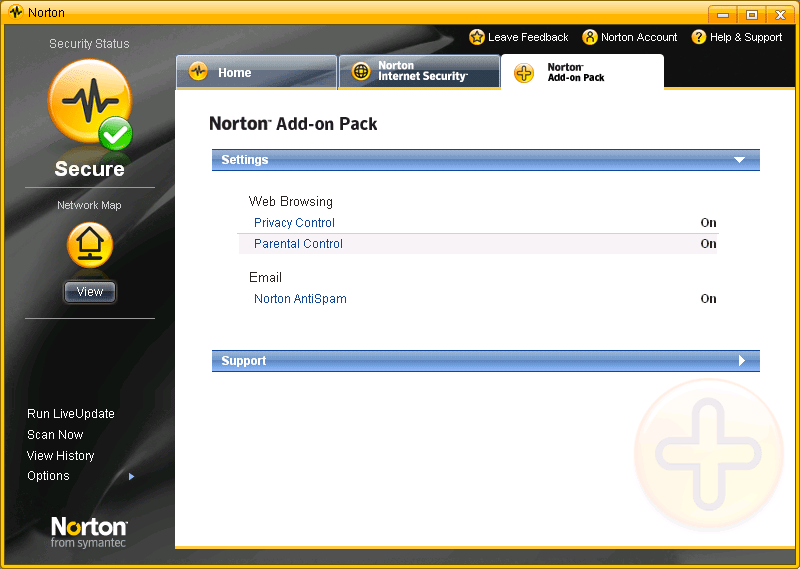
  1. Click Turn On.
  2. Enter your password when prompted. If you have not set up a password for Parental Control, type and confirm your password, and then click OK.

Related Items:

What is Parental Control?
How do I log in as a Administrator?
How do I configure the Parental Control wizard?
How do I turn off or Disable Parental Control?
What are the different levels of restrictions?

Return to Frequently Asked Questions Menu


Juno Home | My Juno | Help | My Account | Corporate | Join Now
About Juno | About United Online | Our Services | Investors | Press | Privacy Policy | Your Privacy Rights: Do Not Sell My Info  | About Ads  |   Terms of Service

        United Online                NetZero        |        Juno        |        MySite    

© 1995-2020 Juno Online Services, Inc. Juno is a registered trademark, and the Juno logo is a trademark of Juno Online Services, Inc.
NGCV




